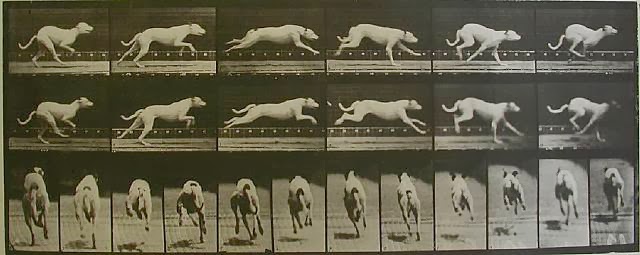
And the running part of this animation is done. Can't believe how long that took. I had an animator friend help critic it all the way and it's become so much better than before and has been a learning curve for not only animating the run cycle but also the work flow.
So the run didn't look quite right and the graph editor was all over the place. So not only did I remove keys that wasn't needed, but adjusted the legs to match and be offset.
Here's the graph editor of before and after looking at one paw.
I had a lot of trouble when I moved onto cycling the run, even taking off the foot roll (which is poorly made as the actual foot moves too when used) so it still kept going weird.
So with motion trail and moving some keys in the graph editor I made it run in one spot.
Next step is to redo the foot roll to make it look better and space out the tongue and blinking so it's not everytime it cycles. And then work on getting it moving or at least animate in the part where he catches his ball. Which I also have to animate.
After watching one of the dog youtube videos I found another way for a dog to run. I wonder if running without touching the ground when stretched is a greyhound trait?
This one always has at least one paw on the ground at any one time. Even in full gait.
I had to draw her ridiculous face.
I think I could get it down to 9 images as 2 and 3 are very close in looks.
I'm onto the hips and shoulders and as you can see the shoulders and front legs still need a lot of work. I'm finding the front half harder than the back half to do for some reason. I think once I get the tilting of the hooves it may look better and no popping of the knees.
Still getting the weird knee pops, I've adjusted the shoulders and height of the hoof lift so now I'm just cleaning up the graph editor to see if that makes a difference.
I've cleaned up the graph editor and at the beginning I've got rid of the knee pop.
Grease pencil to mark out the walk cycle, I did it without but got confused near the end, so I went over it when the pencil to see where I went wrong. It helped a lot.
I will be going back to continue with the horse walk cycle, although I think I will start again and have the horse move it's head like I have in the sketches before I animate the walk cycle. The current one I have makes it look like it's sliding. But it's a learning curve from all the horse walk cycles I've attempted.
There are a few more tweaks I would've liked to have done, like animating individual feathers for wind movement, but I needed to get this done so I can move onto another animation. If I have time at the end, I will go back to this. Overall I'm really pleased with how this turned out and enjoyed animating wings a lot!
I decided to go back to the slower flapping version as it felt easier to animate in.
After I was satisfied with the wing flaps, I started with the up and down movement of the body. (blogger does not want to properly link these for some reason)
The feathers just fixed themselves sometimes, and I chose to ignore them in hopes they will fix themselves.
They did, every so often.
This one is where I made sure the head was as level as it could be compared to the movement of the body.
I tweaked the feet to give it a more natural feel as well as rotating the body a tiny amount.
I wanted to have the eagle flap a few times before soaring, so that was my next step and I cycled all the keyframes, then baked them so I had 3 wing flaps and stopped the cycle to work on the gliding part.
The next step was to animate the eagle coming out of the wings beating down into a glide with the wings outstretched. When I chose to bake the animation I kept half a wing flap where it was coming down to mid-point. I started with the wings to move slightly as birds don't keep them still in a glide, then worked on the body movement.
The horse animation is on hold for a little while.
So I moved onto the flying eagle this week, which I suppose would be a bit simpler. Rig is still a bit dodgy, but workable and there are plenty of references for it such as;
http://www.youtube.com/watch?v=_E1mByB0hoM&feature=youtu.be
This one has some feathers sticking out. This rig is pretty delicate that if I move a wing wrong or just move it, a feather would randomly poke out which slows down my progress to try and correct it so it doesn't look as bad.
Side - http://www.youtube.com/watch?v=PNKs24649PQ&feature=youtu.be
At the base of the wing there is a weight error, I think. Where it pops up. I'm struggling to correct that, but I think I'll leave that until later. The wings folding back doesn't look right, it makes it look like it's swimming rather than flying.
Top - http://www.youtube.com/watch?v=NmDGSZJZmDM&feature=youtu.be
This view makes the wings folding back more obvious and not as good as I thought it would be, so I will have to move them forward again and not fold them as much. I think it would've looked ok on a smaller bird, not an eagle.